
Save Up to 40% on Your Business Email Costs with Hybrid Email Setup
Give Google Workspace or Microsoft 365 to users who need advanced productivity features, while using a more cost-effective business email platform for everyone else — all under the same business domain.
Designed around your users. Built around your budget.

Why Pay for Premium Email for Every User?
Not every employee needs the same email platform. Some users may need Google Workspace or Microsoft 365 for advanced collaboration, storage and productivity features, while others may only need reliable professional business email.
A hybrid email setup lets you use the right platform for each user - without having to maintain separate domains or compromise your professional email identity.
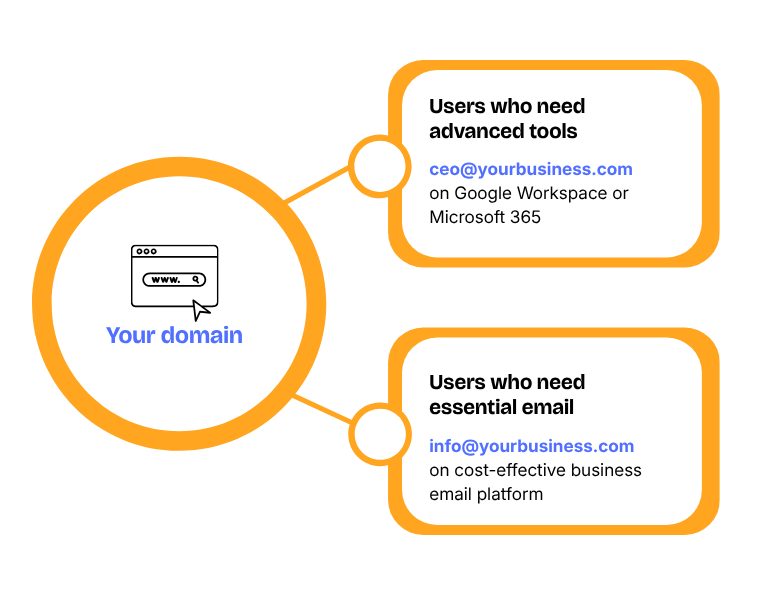
Use Premium Email Where It Matters. Save Where It Doesn't.
Instead of paying for advanced productivity features that every user may not need, allocate premium email platforms to the people who benefit from them and use a more cost-effective platform for the rest.
A Simple Example
A company with 25 employees -
5 users need Google Workspace because they use Gmail, Drive, Meet, Gemini, etc.
20 users primarily need just professional business email.
5 users need Google Workspace because they use Gmail, Drive, Meet, Gemini, etc.
20 users primarily need just professional business email.
Without Hybrid Email Setup
With traditional email setup - all users will be on Google Workspace.
Your Yearly Cost -
25 × ₹3,240/year = ₹81,000/year
With Hybrid Email Setup
5 power users on Google Workspace and 20 on cost-effective email platform like Rediffmail for Work
Your Yearly Cost
(5 × ₹3240)+(20 × ₹1800) = ₹52,200 /year
Savings - ₹28,800 /year
That's ~35% lower email infrastructure cost
All 25 users continue using professional email on the same company domain, while each user gets the storage included with their respective plan.
One domain. Multiple email platforms. One managed setup.
No Technical Skills Required. We Handle Everything.
From email setup on your domain to DNS configurations to user account management and technical support when you need it - we take complete responsibility from start to finish.
Domain & DNS Configuration
We configure your domain and email routing for the hybrid environment.
User Account Setup
We create and configure users across the appropriate platforms.
Email Routing
We configure the routing required to deliver email correctly between platforms.
Ongoing User Management
Add, remove or move users between platforms as your business changes.
Comprehensive Support
One team to contact when you need help with your email infrastructure.

Why Choose Magic Mails Hybrid Email Setup
At Magic Mails, our Hybrid Email setup helps reduce your email infrastructure costs without compromising on productivity.
Best of Both Worlds
Hybrid setup allows you to optimise your email setup capabilities while keeping your budget in check.
Lower Email Costs
Save on your Google or Office 365 billings without sacrificing core features and performance.
Keep Your Existing Domain
All employees continue using the same professional email addresses on your company domain.
Centralized Management
Manage all business email accounts under a single domain. Add or remove users on either platform as your team grows.
Complete Setup & Migration
From email server setup and user account management to migration support, we can handle the technical work from start to finish.
No Change to Email Address
Your customers continue emailing your team at the same addresses. No need to notify them about an email address change.
Find Out If a Hybrid Email Setup Makes Sense for Your Business

Frequently Asked Questions
Find answers to all your queries about Magic Mails Hybrid Email Setup, that will help you make an informed decision!
Hybrid Email Setup is an email platform configuration that allows email accounts from the same domain to be hosted on different email service providers.
Yes. A hybrid setup doesn't have to start with an existing Google Workspace or Microsoft 365 environment. We can design the right mix of email platforms for your team based on user requirements and budget.
Yes. All employees continue using email addresses on your company domain.
Yes. Users can be migrated as your requirements change. However, you will need to take data backup at your end before the migration happens.
Yes - if the email account is active the emails will be delivered to the account on the correct email server.
No. We handle the entire setup, configuration and onboarding for you. You don’t need any technical expertise.
Data migration is available as a paid service, depending on the number of users, mailbox size, source platform and migration requirements.
We offer comprehensive setup, account management and email related support. Further, we provide real human support. You can reach out whenever you face issues — no chatbots, no long ticket delays.